
Missing Fonts Loader plug-in for Adobe Illustrator
Connects Adobe Illustrator with FontExpert and activates missing fonts in Adobe Illustrator document.
For
Adobe Illustrator 2026,
Adobe Illustrator 2025,
Adobe Illustrator 2024,
Adobe Illustrator 2023,
Adobe Illustrator 2024,
Adobe Illustrator 2021,
Adobe Illustrator 2020 24.0 (64-bit),
Adobe Illustrator CC 2017,
Adobe Illustrator CS5
Download plug-ins for Adobe Illustrator
Requirements:
- Adobe Illustrator for Windows
- FontExpert 2025
How to Install
Copy MissingFontsLoader.aip file to Adobe Illustrator's "\Plug-ins\Extensions" folder and restart Adobe Illustrator.
Plug-in command appears in "Window - Missing Fonts Loader" menu of Adobe Illustrator.
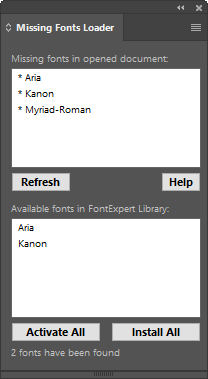
Tutorial in 5 steps: Tutorial - Missing Fonts Loader plug-in for Adobe Illustrator.